It’s very useful to learn how to set up to send mail using Asp.NET, both GMail and Asp.NET are widely used and trusted. One advantage is flexibility: If you’re a setting up a large email system for mass mail-outs to Foxy Bingo customers and other gaming fans, or if you’re a smaller, family business who is just mailing your local clientele, this system is up to the job. Enjoy the tutorial.
So here is another, even briefer, tutorial on sending mail in Asp.NET using GMail SMTP (means using a GMail Account doh!).
Alright, this is what you do:
- If you haven’t done so already, download a .NET development tool like Visual Web Developer 2008 Express Edition.
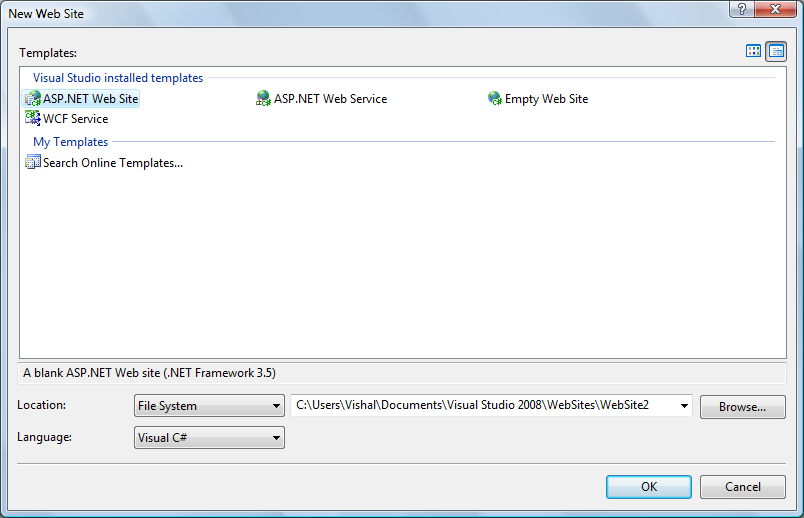
- Go to File>New Web Site, select new ASP.NET Web Site, and choose Visual C# for your language. (Ok, You’ve mostly probably already come up to this stage, but I’m just being complete. 🙂
- Now, by default you’ll see your Default.aspx file, where you can use the visual tools to drag and drop in your files. But you actually want the Default.aspx.cs file to edit. On the right you’ll see your Solution Explorer. Click on the plus and double click on Default.aspx.cs

- Here you’ll have the actual C# code that runs to generate your HTML output for the browser. So this is where you shall put in your C# Mail code. Be sure to edit out like the username (your entire GMail gmail), and password (you know, that one).
using System;
using System.Configuration;
using System.Data;
using System.Linq;
using System.Web;
using System.Web.Security;
using System.Web.UI;
using System.Web.UI.HtmlControls;
using System.Web.UI.WebControls;
using System.Web.UI.WebControls.WebParts;
using System.Xml.Linq;
using System.Net.Mail;

public partial class _Default : System.Web.UI.Page
{
    protected void Page_Load(object sender, EventArgs e)
    {
        sendMail();
    }
    public void sendMail()
    {
        string from="vishalkumar@gmail.com";
        string to = "vishalkumar@gmail.com";
        string subject = "Hi there";
        string body = "Hey there <br /> Check out http://www.vishalkumar.in";
        sendMailall(from, to, subject, body);
    }
    public void sendMailall(string from, string to, string subject, string body)
    {
        MailMessage mail = new MailMessage();
        mail.To.Add(to);
        mail.From = new MailAddress(from);
        mail.Subject = subject;
        mail.Body = body;
        mail.IsBodyHtml = true;
        SmtpClient smtp = new SmtpClient();
        smtp.Host = "smtp.gmail.com";
        smtp.Credentials =
             new System.Net.NetworkCredential("vishalkumar@gmail.com",
                                                                "thisisnotmypassword");
        smtp.EnableSsl = true;
        smtp.Send(mail);
     }
}
- Now just press F5 to debug, which basically means run the page. By simply running the above page, you’ll trigger the code to send an email to the address specified.
- And you’re done for now. You can now add extra features like creating a form, or sending automated emails, etc, for all you like. Enjoy.
And thats it. Alright I admit, you didn’t really need that many steps. Frankly, just copy the code and play with it.
If you get stuck (and you tried really really hard yes please), gmail me later. Or comment up.
15 replies on “Asp.NET Mail using Gmail SMTP Tutorial”
[…] Tutorial for sending email in Asp.NET using GMail SMTP | Vishal Kumar […]
[WORDPRESS HASHCASH] The comment’s server IP (208.101.23.85) doesn’t match the comment’s URL host IP (208.101.30.244) and so is spam.
[…] Tutorial for sending email in Asp.NET using GMail SMTP | Vishal Kumar […]
[WORDPRESS HASHCASH] The comment’s server IP (208.101.23.85) doesn’t match the comment’s URL host IP (208.101.30.244) and so is spam.
[…] Tutorial for sending email in Asp.NET using GMail SMTP | Vishal Kumar […]
[WORDPRESS HASHCASH] The comment’s server IP (208.101.23.85) doesn’t match the comment’s URL host IP (208.101.30.244) and so is spam.
hhiiiiiii
i did ur process ,,, i run the program
but it is showing untitled page
plzzzzz help me how to send mail with attachment file to mail id
it will be moreeeeeee helpful for my project plzzzzzz
hiiiiiiiiiiiii
ya i received mail yar i am very happyyyyyyyyyyyyyyy thank u soooooooooooooo muchhhhhhhhhhhhh
plzzzzzzzzzzzzz tell me about the attachment file
how to send mail with attachment file
plzzzzzz teach me yar
Hey janani, sorry for the late reply.
Please have a look athttp://msdn.microsoft.com/en-us/library/system.ne…
Critical are these lines:
// Create the file attachment for this e-mail message.
Attachment data = new Attachment(file, MediaTypeNames.Application.Octet);
// Add time stamp information for the file.
ContentDisposition disposition = data.ContentDisposition;
disposition.CreationDate = System.IO.File.GetCreationTime(file);
disposition.ModificationDate = System.IO.File.GetLastWriteTime(file);
disposition.ReadDate = System.IO.File.GetLastAccessTime(file);
// Add the file attachment to this e-mail message.
message.Attachments.Add(data);
ya i received e mail..very happy thank you so much
then if u can reply me… how to send sms by asp.net with c# ….
thank you dr.
Thank you
hi in my project i used the following code…please check whether it is correct or not.
—-SMTP Mailing in GMAIL—-
i) take the source of web configuration file
change the code as follows:-
</system.web>
<system.net>
<mailsettings>
<smtp from="yourname@gmail.com">
<network host="smtp.gmail.com"port="587" username="yourusername"password="yourpassword"/>
</smtp>
</mailsettings>
</system.net>
ii)FORM CODE:-
Linkbutton1_click
{
smtpclient s=new smtp client();
e.enable ss1=true;
s.send("youremail@gmail.com",textbox1.text,textbox2.text,textbox3.text);
response.write("Succes");
}
}
thanks sir what a logic
hey, i tried to run ur code but getting error as follows:
Compiler Error /message: ASPNET: Make sure that the class defined in this code file matches the ‘inherits’ attribute, and that it extends the correct base class (e.g. Page or UserControl).
Source Error:
Line 12: using System.Net.Mail;
Line 13:
Line 14: public partial class _Inquiry : System.Web.UI.Page
Line 15: {
Line 16: protected void Page_Load(object sender, EventArgs e)
Please help me to solve the error. Waiting for ur reply.
H Sir,
I have tried out the code given above and still had problem with sending email in asp.net. First i tried this code
Dim mail As New MailMessage
mail.From = New MailAddress(“myuserid@yahoo.com”)
mail.To.Add(from)
Mail.Subject = “The Subject”
Mail.Body = “Body text here”
Mail.IsBodyHtml = True
Mail.Priority = MailPriority.High
Dim smtp As New SmtpClient(“smtp.mail.yahoo.com”)
smtp.Port = 465 ‘this could be 587, not sure
smtp.Credentials = New System.Net.NetworkCredential(“username”, “password”)
smtp.EnableSsl = True ‘SSL is required I think
smtp.Send(mail)
then i got an error “failed to send email”
Please help how i can send email from my website. Please help me by sending whole code to me
something some where missing. I don’t know what it was… Please help me at your earliest
Hi Friend
I m searching a very good guys who expert in php and .net in mail Admin please send me cv jai4bmw@yahoo.com
vishal can we talk please give me ur mobile no or call me 9910593309
i tried whole code as same wat u wrote but i am getting an error
smtp.Send(mail);
error is::::::
Failure sending mail.
pls tell
regards