Alright, this was one of the queries I got a few days back. I finally got the time to pour some time on it.
So here is the tutorial for sending PHP Mail using Gmail as your SMTP engine.
First of you all, I’m going to pretend that you’re familiar with a few things:
- PHP (you know, PHP: Hypertext Preprocessor). Its a lovely language for developing webpages. If you already knew that, then good. If not, you might want to read a good PHP Tutorial.
- A local apache+PHP webserver running to test with. I use either XAMPP or WAMPServer, while on Windows Vista. Or install LAMP stack in Ubuntu.
- Can edit your PHP.ini configuration file. (If you don’t know what I’m talking about, get really familiar with the above two.
K, here goes.
- If you haven’t done so already, get a PHP server running.
- Download PHP-Mailer (they also have other php software for easy form-to-email).
- Go to your C:\xampplite\htdocs folder (in XAMPP) or C:\wamp\www folder (in WAMP), and extract the PHP Mailer into it. I’ll call this folder Root from now on.
- Now go to Root\PHP-Mailer\examples\, and open up test_smtp_gmail_basic.php.
- Now you shall have to do some minor editing. Don’t worry, its majorly minor. Just change the Emails to your send and receiver, and type your password. Here’s what mine almost looks like. Almost. Thats not the password. … I think.

$mail->IsSMTP(); // telling the class to use SMTP
$mail->Host = "stmp.gmail.com"; // SMTP server
$mail->SMTPDebug = 1; // enables SMTP debug information (for testing)
// 1 = errors and messages
// 2 = messages only
$mail->SMTPAuth = true; // enable SMTP authentication$mail->SMTPSecure = “ssl”; // sets the prefix to the servier
$mail->Host = “smtp.gmail.com”; // sets GMAIL as the SMTP server
$mail->Port = 465; // set the SMTP port for the GMAIL server
$mail->Username = “vishalkumar@gmail.com“; // GMAIL username
$mail->Password = “topsecretpassword:D“; // GMAIL password
$mail->SetFrom(‘vishalkumar@gmail.com‘, ‘Vishal Kumar’);
$mail->AddReplyTo(“vishalkumar@gmail.com“,”Vishal Kumar”);
$mail->Subject = “Hey, check out http://www.vishalkumar.in”;
$mail->AltBody = “Hey, check out this new post on www.vishalkumar.in”; // optional, comment out and test
$mail->MsgHTML($body);
$address = “vishalkumar@gmail.com“;
$mail->AddAddress($address, "Vishal Kumar");
- Now, pressing save, you’ll be half done with this little tutorial. Ok, the actual step is you need to edit your PHP.ini file settings. You can find that C:\xampplite\php if you are into XAMPP. Here you need to open the PHP.ini file, then search for “openssl”. Go ahead and take that ‘;’ comment symbol from the start of the line. In WAMP, all you need is your mouse. Just click on the speedometer icon of WAMPServer in the taskbar. Go to PHP>PHP Extensions and click on php_openssl to turn it on
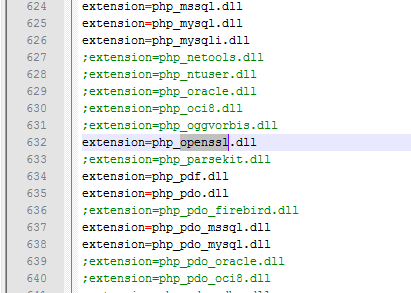

- Restart your servers services. This should be fairly simple
- Go navigate to http://localhost/PHP-Mailer/examples/test_smtp_gmail_basic.php in your browser. And then check your Receivers Inbox. Hi!!!
Thats about it; thats how I managed to send emails using GMail’s SMTP engine to any mail, through PHP.
Note though, this tutorial is meant to be a specific reply to a certain query I got, but I figured more people would want to read this, so I posted it up.
If you have any doubts, or extensions, or any helpful suggestions, comment up. 🙂
108 replies on “PHP Mail using Gmail SMTP Tutorial”
Hey dude thx very very much this post really helpedme alooooooootttttttttttt 🙂 u r the best
Hi, its nice to see your blog. can any one enter IIMB to see such an exiting place??
Hey Dear..How to process First of to last step sen email in PHP and how to set configure php,ini file…….
pls help me now.pls……
<?php
//require("phpmailer/class.phpmailer.php");
include("phpmailer/class.phpmailer.php");
$mail = new PHPMailer();
$mail->Host = "ssl://smtp.gmail.com::465";
$mail->SMTPSecure = "ssl";
$mail->IsSMTP(); // send via SMTP
IsSMTP(); // send via SMTP
$mail->SMTPAuth = true; // turn on SMTP authentication
$mail->Username = "mygmailaccount@gmail.com"; // SMTP username
$mail->Password = "mygmailaccountpassword"; // SMTP password
$webmaster_email = "mygmailaccount@gmail.com"; //Reply to this email ID
$email="mygmailaccount@gmail.com"; // Recipients email ID
$name="name"; // Recipient's name
$mail->From = $webmaster_email;
$mail->FromName = "Webmaster";
$mail->AddAddress($email,$name);
$mail->AddReplyTo($webmaster_email,"Webmaster");
$mail->WordWrap = 50; // set word wrap
$mail->AddAttachment("/var/tmp/file.tar.gz"); // attachment
$mail->AddAttachment("/tmp/image.jpg", "new.jpg"); // attachment
$mail->IsHTML(true); // send as HTML
$mail->Subject = "This is the subject";
$mail->Body = "Hi,
This is the HTML BODY "; //HTML Body
$mail->AltBody = "This is the body when user views in plain text format"; //Text Body
if(!$mail->Send())
{
echo "Mailer Error: " . $mail->ErrorInfo;
}
else
{
echo "Message has been sent";
}
?>
am getting follwing errors…..
Deprecated: Function eregi() is deprecated in D:wampwwwffphpMailerclass.phpmailer.php on line 594
Warning: fsockopen() [function.fsockopen]: SSL operation failed with code 1. OpenSSL Error messages: error:140770FC:SSL routines:func(119):reason(252) in D:wampwwwffphpMailerclass.smtp.php on line 125
Warning: fsockopen() [function.fsockopen]: Failed to enable crypto in D:wampwwwffphpMailerclass.smtp.php on line 125
Warning: fsockopen() [function.fsockopen]: unable to connect to ssl://localhost:25 (Unknown error) in D:wampwwwffphpMailerclass.smtp.php on line 125
Mailer Error: SMTP Error: Could not connect to SMTP host.
thanks in advances….
thanks for ur turtorial. I have one question for u vishal.can you please tell me how to send twit to twitter using php
hello vishal kumar,
i m trying to install a prog. in my system but after installation when run its index.php then it shows login screen and when i type user name and password which i allready created during installation process it shows wrong user name /password message. i don't know where i m wrong but i think i m doing wrong when third step of installation ask for SMTP server IP address then user name and password.
i m using google as a smtp server but still i don't understand what is the IP adress of SMTP server and how can i find IP adress of SMTP Server. will u please help me to install this software in my system as wel as my web server. if u wish i can send u prog. what i m installing in my system. my mail ID is classresult@gmail.com.
Hey, what software are you using? It might help if you put the links for it.
And when specifying the STMP address you don't need to put in the IP Address anywhere. Its the smtp.gmail.com thats required. The DNS Servers will send the smtp.gmail.com request to the correct IP Address.
i m using google as a smtp server but still i don’t understand but any world meanig to ask general
hi vishal'
Your tutotial helped me a lot to send mail using smtp authentication in php, am using Xampp1.7.1, while trying to send error i get the following error.
Error : authentication failure [SMTP: Invalid response code received from server (code: 535, response: authentication failed (#5.7.1))]
but when tried to send mail using outlook, it works perfectly, please help me
Dear Vishal!
I am using google apps. for email.
actually i am very confusing on web form processing.
I couldn't able to send email from my website form to my email.
my ISP saying to use smtp in form they saying
———————————————xxxxxxx———————————————
We have disabled anonymous user to send mail, so you have to send mail through SMTP authentication and smtp details are given below:-
Host:- mail.your_domain_name
User name:- XXX@your_domain_name
Password:- corresponding password
Port :-25 or 26
———————————————xxxxxxx———————————————
But is didn't work, after they saying that it is bcz of your are using google apps.
Please reply me solution with any example.
I read your tutorial , but, i didn't get it. right
i want to send email from this way but this tutorial is not well explained. can you explain with any example .
I don't know php so details.
Please Vishal!
I am waiting your reply.
Hey, did you manage to get it working on a local installation (or WAMP or XAMPP)?
yea its simple using smtp
Salam
thankx …. and thankx again….
i am learning php , i am trying send massege localhost (xampp),how can i do it. can you help me pls.
thanks dude your tutorial is good.
i get this error:
Parse error: parse error in C:wampwwwPHPMailer_v5.1examplestest_smtp_gmail_basic.php on line 28
do you change your php.ini at all??/
Yes, the php.ini needs to be edit. Check the tutorial again.
For the parse error, you might have accidentally deleted a few characters or misspelled a word.
your tutorial is gud but i want to build a e-mail server ….project like yahoo or gmail e-mail system..plz if u can help me then send me that piece of code(php)….example inbox,sent .drft.etc….so if u can …..help me…
hope…u solved my problem..
thanks buddy, thats why Indians are better than …………..
Thx man….
this was the best tutorial for sending mail…
it worked like a charm 😉
u r the best 🙂 🙂
Hi Vishal,
Great Tutorial, I have configured everything using your tutorial and the mail gets sent to my gmail account. Just wanted to ask you something, I have created an email form where I want to click on the Send Button and this should send an email to my gmail account, how do I do this? Will be waiting for your reply. Many thanks
In your email Form, you would be making use of the <form> tag and assigning it an action (the PHP mail sending page), and a method (either GET-send the data in the URL address, or POST-send it in the request itself, so it doesn't appear in the URL).
So you'll have <form action="sendmail.php" method="post">…
Then in your sendmail.php, you need to receive the variables.
Access the form elements in the previous page with '$_POST['name']'. So instead of the strings in the demo email sending above, you would use the POST variables.
Hi Vishal
Thanks for your help, I managed to do it 🙂
Regards
Shil
what you have done is good vishal but I would like to mention that u are no where using standard "mail()" function of PHP which dosen't work unless
1> u send mail from localhost to localhost
2> u have a registered domain on the webspace
anyways nice tutorial…great job
yes u said rite main
Hi Vishal
I have configured everything using your tutorial and the mail net gets sent to my gmail account.
actually it is not shown any error and not send the mail
Where have you hosted this? Have you started from fresh? You can also enable error messages by setting STMPDebug to 1.
Also check out that your PHP is working by enabling error messages in php.ini (search for error_reporting ), and making sure theres a line like error_reporting = E_ALL
it not working . wht to do of include("class.phpmailer.php");include("class.smtp.php") ?
Leave those. Just make the changes specified in the code above. Most of the work is already done (thanks to PHPMailer). 🙂
I need smtp
Thank you for your useful information 🙂
do i need to also make changes at the php.ini at the part below?
[mail function]
; For Win32 only.
;SMTP = localhost
;smtp_port = 25
; For Win32 only.
;sendmail_from = root@localhost
You needn't touch the mail function. This works without that. The only change you need to do is the SSL, in php.ini
Hi vishal , i have followed instructions above but when i run test_smtp_gmail_basic.php in browser it doesn't display anything and email is not delivered. i am using wampserver 2.0 please help me out.
Thanks.
Are you sure you followed instructions to the letter?
First check that normal php pages are being displayed (i.e. wamp is running as it should). Create a test.php page in your www folder, and put in <?php echo "hi"; ?>
Then open the page by going to your http://localhost/test.php. You should see a "hi".
If you don't, check click on the wampserver logo and select Start All Services.
If you have started the services and you were just thinking that yada yada yada I've already done all of that, please make sure that you've edited the php.ini page.
If even that doesn't work, try using XAMPP, and try with the same instructions.
i tried all your instructions but still getting following error while creating new tickets.
Warning: mail() [function.mail]: SMTP server response: 501 5.5.4 Invalid Address in C:Inetpubwwwrootosticket_1.6.0uploadincludepearMailmail.php on line 128
got this error. can u help me?
SMTP -> ERROR: Failed to connect to server: Unable to find the socket transport "ssl" – did you forget to enable it when you configured PHP? (104113184)
SMTP Error: Could not connect to SMTP host. Mailer Error: SMTP Error: Could not connect to SMTP host.
uncomment (remove ;)the "extension=php_openssl.dll" if it is available in php.ini file .fi it is not there in php.ini file add "extension=php_openssl.dll" in Dynamic extensions in php.ini file
I found this error
SMTP Error: Could not connect to SMTP host. Message was not sent.Mailer error: SMTP Error: Could not connect to SMTP host.
very good tutorial vishal..
i had some problems in php versions initially but got over 'em..
Great work!!
Hi Vishal, can i use this code to send an email to my gmail account from the website i have host…? if yes, could u tel me the way to do it…?
Thanks buddy. It has helped me and gifted me a smiley face.
🙂 This one is for you.
Thanks again
I got the following error:
SMTP -> ERROR: Failed to connect to server: Unable to find the socket transport "ssl" – did you forget to enable it when you configured PHP? (24439416)
SMTP Error: Could not connect to SMTP host. Mailer Error: SMTP Error: Could not connect to SMTP host.
uncomment(remove 😉 "extension=php_openssl.dll" in php.ini file .If it is not available in php.ini file add extension=php_openssl.dll
thanks boss
hii Vishal,
i have followed instructions above but when i run test_smtp_gmail_basic.php,
but i get this error :
"SMTP -> ERROR: Failed to connect to server: A connection attempt failed because the connected party did not properly respond after a period of time, or established connection failed because connected host has failed to respond. (10060)
SMTP Error: Could not connect to SMTP host. Mailer Error: SMTP Error: Could not connect to SMTP host."
why this happen?can you help me,please….
thank you so much for your effort by making this tutorial..
i have been looking for this solution almost 3 weeks..
now i can finish my final year project..
thanks again..
thanks dear,you really wrote all these steps very clearly,
i again really-2 thankful to you
-amit dubey
New Delhi,India
<?php
$to = "sony@gmail.com";
$subject = "Test mail";
$message = "Hello! This is a simple email message.";
$from = "sony@gmail.com";
$headers = "From:" . $from;
mail($to,$subject,$message,$headers);
echo "Mail Sent.";
?>
In php.ini
[mail function]
; For Win32 only.
; http://php.net/smtp
SMTP = smtp.gmail.com
; http://php.net/smtp-port
smtp_port = 465
auth_username = sony
auth_password = asdsa
pop3_server = smtp.gmail.com
pop3_username = sonyi
pop3_password = asdsa
Still its not working . Please mail me at isprivacy@gmail.com with correct solution.
Thanks
Sony.K
Have u got the solution..?????????
hello Vishal!
I am using google apps. for email. and i am try to send mail by using phpmailer.
my php code has work good with my gmail account like abc@gmail.com.
but when i am try to send mail with my google apps email like abc@owndomain.com, it's not worked.
so please tell me which extra setting i have to done to send mail.?
thanks
Thank you so much..I am very happy… I had googled for total 20 hours "how to send main using php script?"..
But all in vain.. At last your post helped me to get rid of my problem…
For the time being its working very fine.. 😀 😀 😀
Thank you so much..I am very happy… I had googled for total 20 hours "how to send main using php script?"..
Do i need to edit anything on php.ini file and php extension php_open_ssl but nothing is being displayed what we need to write in include_path in php.ini file i don't know what we need to edit in php.ini. i have followed all your instructions but blank page is being displayed when i open http://localhost/phpmailer/PHPMailer_5.2.0/examples/test_smtp_gmail_basic.php page.
thanks u so much buddy your tutorial is so Cool. 🙂
it worked for me thanks sooooooo much i was having probs with it for a long time… thanks again
I need to have contact form on facebook page. The user should be allowed to fill the form and submit it. The submit function should get the inputs of user and mail it to my gmail id..
For this , can i use the same code mentioned above….
I'm new to PHP, i can't find this information for past 2 months. This info is very useful and very easily to understand….. Lots of thanks to Vishal….
This is the real link to the php example folder http://denby.eu/projects/courtBooking/browser/inc…
Now go to RootPHP-Mailerexamples, and open up test_smtp_gmail_basic.php.
I could not found PHP-Mailerexamples in downloaded file.plz help
It's Working…………………. Thanks bro………u r the best………………..
.
am guna shekar . there is no file called test_smtp_gmail_basic.php in that PHP mailer.zip. den how come the above people just lie that this tutorial worked well for them….
Hi Vishal,
i m getting following error on my local machine.
SMTP -> ERROR: MAIL not accepted from server: SMTP -> ERROR: RCPT not accepted from server:
cannot find: RootPHP-Mailerexamples
thx dude, its realy great that's working perfectly thnx once again
Good write up Vishal.
if u intent to send any email to google or yahoo or any major email provider you'll probably need to append a 'return path' (bounce mail address) on the headers <code>Return-Path:name@example.com</code>, otherwise your email might be consider as spam and end up in the spambox. not where it should be. Just my 2cents
Warning: mail() [function.mail]: "sendmail_from" not set in php.ini or custom "From:" header missing in C:wampwwwmailmail.php on line 27
Cannot Send Email
Pls Send me Properly worked file plsssssss
[…] main reason to get those old posts was to continue making sure this one post PHP Mail using Gmail SMTP, written one cold and vengeful day when I decided to write the tutorial so that none after me would […]
Hi,
You can find out more on the same topic on below given URL in details , as we had faced the same issue with & without Gmail SMTP and updated scripts are working perfectly fine with same .
Visit http://blog.geek4support.com
Thanks
SHAIL
Thanks a lot Vishal Kumar! Your tutorial is really a good one. But please tell me whether it’s the only way of sending mails from localhost in PHP, i.e., when we don’t want upload our site and want to continue testing it on localhost? You know that the mail( ) function is already there in PHP but when I use it, I get this error message:
“Warning: mail() [function.mail]: Failed to connect to mailserver at “localhost” port 25, verify your “SMTP” and “smtp_port” setting in php.ini or use ini_set() in C:\wamp\www\CompleteSite\Copy of MailTry.php on line 9″
When I use ini_set( ) function for setting smtp then I get this error message:
Warning: mail() [function.mail]: SMTP server response: 530 5.7.0 Must issue a STARTTLS command first. y2sm10787087wix.7 in C:\wamp\www\CompleteSite\Copy of MailTry.php on line 9.
Please do reply.
Thanks in advance,
Regards,
Iqbal Khan
Hello ,
I am getting the error,How to resolve
Warning: mail() [function.mail]: SMTP server response: 550 5.7.1 Unable to relay for info@XXXXX.com in C:\Inetpub\wwwroot\m\sendmail.php on line 7
sir,
Warning: mail() [function.mail]: SMTP server response: 550 5.1.8 invalid/host-not-in-DNS return address not allowed
this has occured !!
am not getting it!!
please help me!!
please mail your answer!!
thanks
helped me quite a lot
I want to deliver sms or email to register user on date of expiry.Can u help how this can be done.
how to add editor in the message and send html email ?
You could try using SMTP4PHP also! 🙂
https://plus.google.com/109110210502120742267/about
You are excellent and this blog is excellent too. I think you should start your tutorial site
Vishal Kumar;
You did this tutorial I don’t know how long ago. But today August 11, 2012, you help me to make progress on my project and I am grateful to you. Thanks a lot,
Mike
Power to this post!! Thanks a lot.. it helped me!!
Hi – anyone care to help me write a script for sending emails from “Contact Submission Form” of a website ?
The webhost where i’m hosting does NOT provide PHP sendmail. The support team have suggested in using “Gmail SMTP Service” for sending emails.
The content of the script should include the following :
Use SMTP Server for E-mail: Yes
SMTP Server Address: ssl://smtp.gmail.com
SMTP Server Port: 465
Authentication Method: PLAIN
SMTP username: [Your Gmail or Google Apps E-mail address]
SMTP password: [Your E-mail Account password]
The body of the script should be contained in the following structure;
Thanks in advance.
Hello Sir,
I’m begineer in PHP.So,i don’t understand very well.your tutorial.But when i follow your tutorial by installing to phpmailer0.9 then it was not showing test_smtp_gmail_basic.php in phpmailer folder which i unziped.But i try from my side(any example) then i failed. So,could you plz help me ….why test_smtp_gmail_basic.php file was not found …I’m using wamp 2.2
Hi Every 1,
I need your help i m making a new application on php for mass mailing though smtp.single smtp is working fine but i want to use multiple smtp to send email. when i use this my mail is stop to sending the file can you please tell me what code i use for sending mail though multiple smtp for mass mail plz i m waiting for your reply bro
hey there is no examples folder in php mailler.PLZ HELP
hello, i have found a solution in other website
http://www.tek-tips.com/viewthread.cfm?qid=1653000, thanks to all
jmoron82@hotmail.com
dear i need send email in php SMTP gmail.
please send me program files..
Thanks,
S.Suresh
Simpliest solution:
SMTP4PHP is a collection of PHP classes, dedicated for composing and sending multipart/mixed email messages quickly and easily, with or without embedded images and/or attachments.
from = new User(SENDER_NAME, SENDER_EMAIL);

$e->to = new User("Receiver's name", 'address@some-domain.com');

$e->subject = 'SMTP4PHP Test mail';

/*

// EXAMPLE: add inline image example

$e->htmlMessage = 'This is a HTML message!addImage('./image.jpg').'" border="0">';

*/

$e->txtMessage = 'This is a TEXT message!';

/*

// EXAMPLE: add attachment example

$e->addAttachment('Attachment.zip');

*/
$smtp = new SMTP(SMTP_SERVER, SMTP_SERVER_PORT, /* SMTP USER */SENDER_EMAIL, /* SMTP PASSWORD */ SENDER_PASSWORD);
/* NOTE: ALL emails are sent through the same connection, speeding up transmission. */
try { $smtp->send($e); /* OR $smtp->send($e,$e1,$e2);*/ }
catch(Exception $e) { }
var_dump($smtp->SMTPlog);
?>
Hi,
I found this when trying it on my local machine, can you suggest me how to solve it.
Failed to connect to smtp.mail.com:465 [SMTP: Invalid response code received from server (code: -1, response: )]
Thanks
why there is no test_smtp_gmail_basic.php in PHP-Mailer folder?
i have completed 1st step.but i acan’t get php.ini.plz help me.
Sorry i get php.inn but i can’t get openssl.dll.plz help me
a
I know it was always looking for trouble if you try to use your free Gmail acount as the SMTP server for your web application. I used for tests while writing this tutorial my Google Apps account. The best choice is an alternative SMTP service, Sendgrid is cool and offers a free account as well (enough for smaller applications)
selling vishalkumar.com for 1.45 L, if interested let know
Thanks for the code. I used it and it worked but I’m getting an error along with “message sent” as….
Invalid address: ‘, ‘Message sent!
this is the error i’m gettin. please help. and also tell me how to add cc, bcc in the same code…thank you
Your site is tooo good…i was trying from 1 month but i failed.but your site helped me to resolve the problem,..thanx budddy…………
[…] PHP Mail using Gmail SMTP Tutorial […]
i want the php code for if click the send button to open a gmail compose mail (via-plugins).If it’s possible pls send the code vishal
I followed the steps exactly the way you told. Just the thing is that m getting message body empty error.I could’nt understand which message body it relates to.
Please help.
waiting for reply
hello vishal,
i follow all the step according you, but when i run test_smpt_gmai_basic.php file they throw error
please help me
SMTP -> ERROR: Failed to connect to server: php_network_getaddresses: getaddrinfo failed: No such host is known. (0)
SMTP Error: Could not connect to SMTP host. Mailer Error: SMTP Error: Could not connect to SMTP host.
Invalid address: user@gmail.comInvalid address: user@gmail.comInvalid address: user@yahoo.comMailer Error: You must provide at least one recipient email address.
I tried PHPmailer with WAMP it worked fine on my local laptop, when i uploaded it to the server I am getting the above error.
What could be the problem? I am using 000webhost free hosting service with
Apache ver. 2.2.19 (Unix)
PHP version 5.2.*
MySQL ver. 5.1
Thanks in advance!!
Thanks a pile buddy !
you made my day.
thank you for providing correct code..it does work…too good…..
Hi Vishal,
can this code be used in codeigniter for sending an email verification to every user who ever registers it with their email id.with declaring a variable and passing it via post method for processing and sending the mail back.Please share any codeigniter code if you have worked with ….may be basic stuff.just to understand the working.
thanks in advance
Thanx a lot..your blog was really helpful!! 🙂
sir i download PHP-mailer and extract it also but i didn’t get test_smtp_basic_gmail.php
what can i do sir pls help me
Is it possible to attach any file along with this through the php script? Can u please explain about it?
And is possible to mail directly from my pc without using gmail server?
-Thanks
Hi Vishal,
I am beginner in php,and i want to send mail using php.
Following code I am using but but it shows message “Sending Failed”.
Please help me to resolve this. I will be very thankful to you.
Invalid address: SMTP -> ERROR: Failed to connect to server: (0)
The following From address failed: root@localhost : Called Mail() without being connected
what i do for this error